At HookSounds, you have your own dashboard to add the URL to your Social Media channel(s) such as YouTube, Instagram and Facebook, in order to get cleared and avoid copyright claims.
Follow these steps to whitelist your channels:
- First, go to your profile: click on your name on the top right of the page, select Profile to access your dashboard.
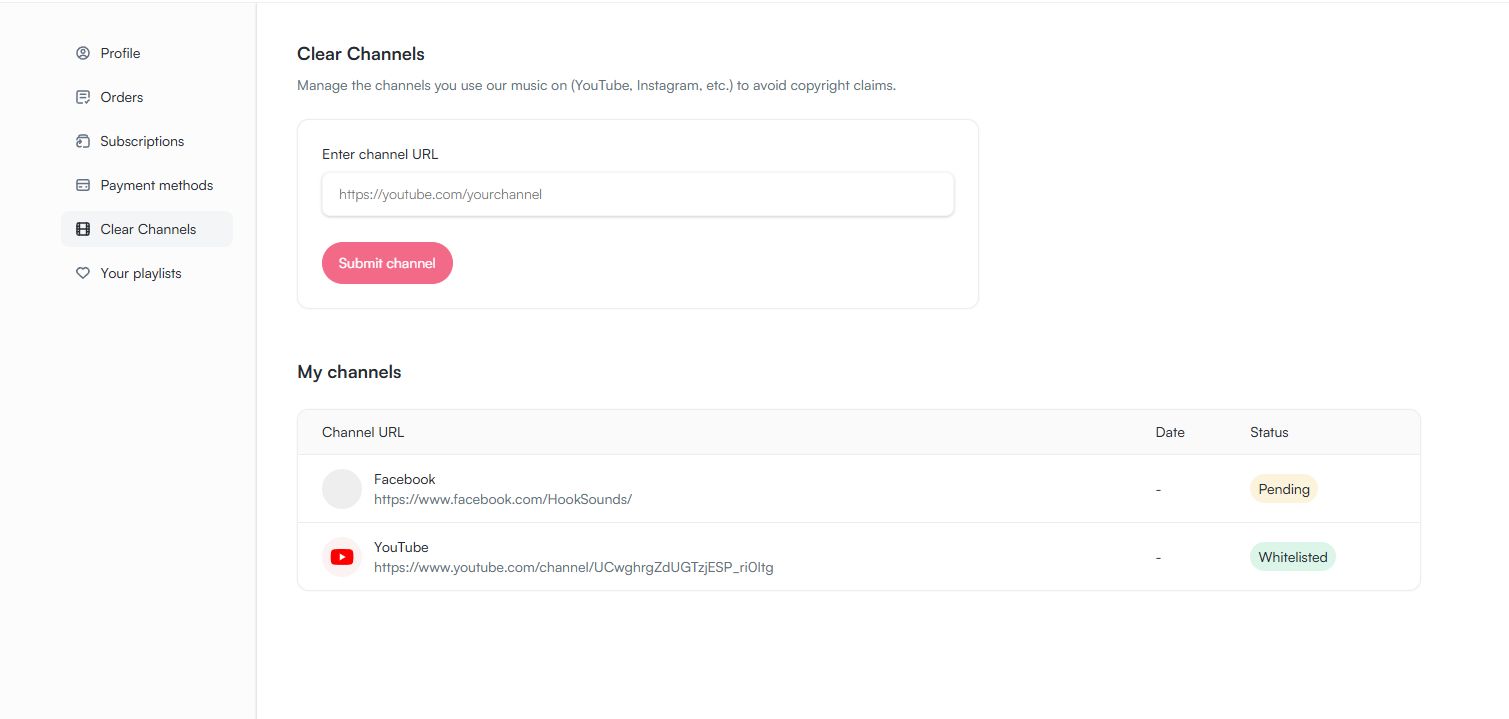
- Go to Clear Channels (under the Account list on your left)
- Add the link in the corresponding field on top. Please make sure that this is your channel link - not the link to a video or post. Make sure that the URL is correct. It cannot be modified after the submission.
- Click on "Submit channel". That will add the channel to your whitelist "My channels" below.
That's it. Your channels will be whitelisted automatically. It could take up to 2 hours until you see a green "Whitelisted" label on the right side of the channel entry in the list below. Until then, you will see a yellow "Pending label", meaning that your channel us about to be whitelisted.
Once you see this green label with the status "Whitelisted", you are cleared to start posting content with the downloaded music on your channel.
If you have any questions about the whitelist or if you made a mistake when entering the URL, don't hesitate to reach out to us through our chat support or simply via email to support@hooksounds.com.
We will be more than happy to help!